BRANCHSCAIPE·Case study
A new conversation architecture for AI interfaces.
Human curiosity doesn’t move in straight lines — but every AI chat forces it to. Branchscaipe reimagines the conversation itself: a structured, branching space where you can explore freely and never lose your place.
- Role
- Product design, interaction & prototyping
- Type
- Self-initiated concept
- Platform
- Web · desktop-first
- Focus
- Conversation architecture
Today’s AI treats every conversation as one endless vertical timeline. Branchscaipe replaces that timeline with a hierarchy.
A single thread can branch into focused sub-conversations — each one navigable, mergeable, and impossible to get lost in. It’s not a smarter model or a better prompt box. It’s a rethink of the structure a conversation lives in, built around the way people actually explore ideas: non-linearly.
The tension
Linear interface, non-linear thought.
The move
From one long list to a branching hierarchy.
The payoff
Explore freely, never lose your place.
Current AI interfaces use a unidirectional, linear flow that contradicts the non-linear nature of human thought.
For a casual one-off question, that’s fine. But the moment a conversation holds more than one idea at a time, the single timeline becomes a structural bottleneck — and it’s not just me who feels it.
The research
A 2024 study from Tsinghua University and the Beijing Institute of Technology found that linear dialogue interfaces poorly serve scenarios with “multiple layers and many subtasks” — brainstorming, structured learning, large project analysis. Linear interaction, it noted, forces people to “repeatedly compare, modify, and copy previous content,” driving up cognitive load and dragging down efficiency.
“Branching out of conversations has been a major problem I've been facing… no merging back to parent, no controlled context. What I mostly wanted was to branch off a part of my discussion to avoid context pollution — and switch branches easily and quickly.”
“What I needed most was the ability to change direction. 'What if I'd continued from a different angle?' kept echoing — but these efforts were limited by the linear structure of the chat.”
Problem statement
Curious learners can’t easily explore ideas non-linearly inside AI conversations — because linear interfaces create context pollution, increase cognitive load, and breed anxiety around diverging from the main thread.
What actually happens in a session
You sit down to learn one thing. Curiosity pulls you sideways. Each detour is reasonable on its own — but the linear thread has no way to hold them apart, so they tangle into a single scroll you can no longer navigate.
The cost of organising the conversation quietly becomes higher than the cost of the questions themselves.
One thread, five topics deep
- Learning React Hooks
- → wait, what are closures?
- → and callbacks?
- → how does the event loop work?
- ← now… back to Hooks?
The thread is now a mix of five subjects. The AI’s context is polluted; yours is too.
Key pain points
Context pollution
Unrelated topics pile into one thread until neither you nor the AI knows what the conversation is really about.
Scroll fatigue
Key answers get buried hundreds of messages up. Finding them again means scrolling — endlessly.
No room to explore
Every tangent feels risky, so curiosity gets suppressed instead of followed where it wants to go.
Efficiency loss
People repeatedly compare, copy, and re-paste earlier content just to hold the context together.
Anxiety of divergence
Users hesitate to ask the interesting side-question for fear of “ruining” the main thread.
Cognitive friction
The interface leans on your memory — which chat held which idea — instead of supporting it.
Three people feel the linear thread differently — but all hit the same wall.
A researcher guarding a clean context, a developer juggling parallel workstreams, and a student rabbit-holing through a topic. I mapped all three, then followed the sharpest case forward.
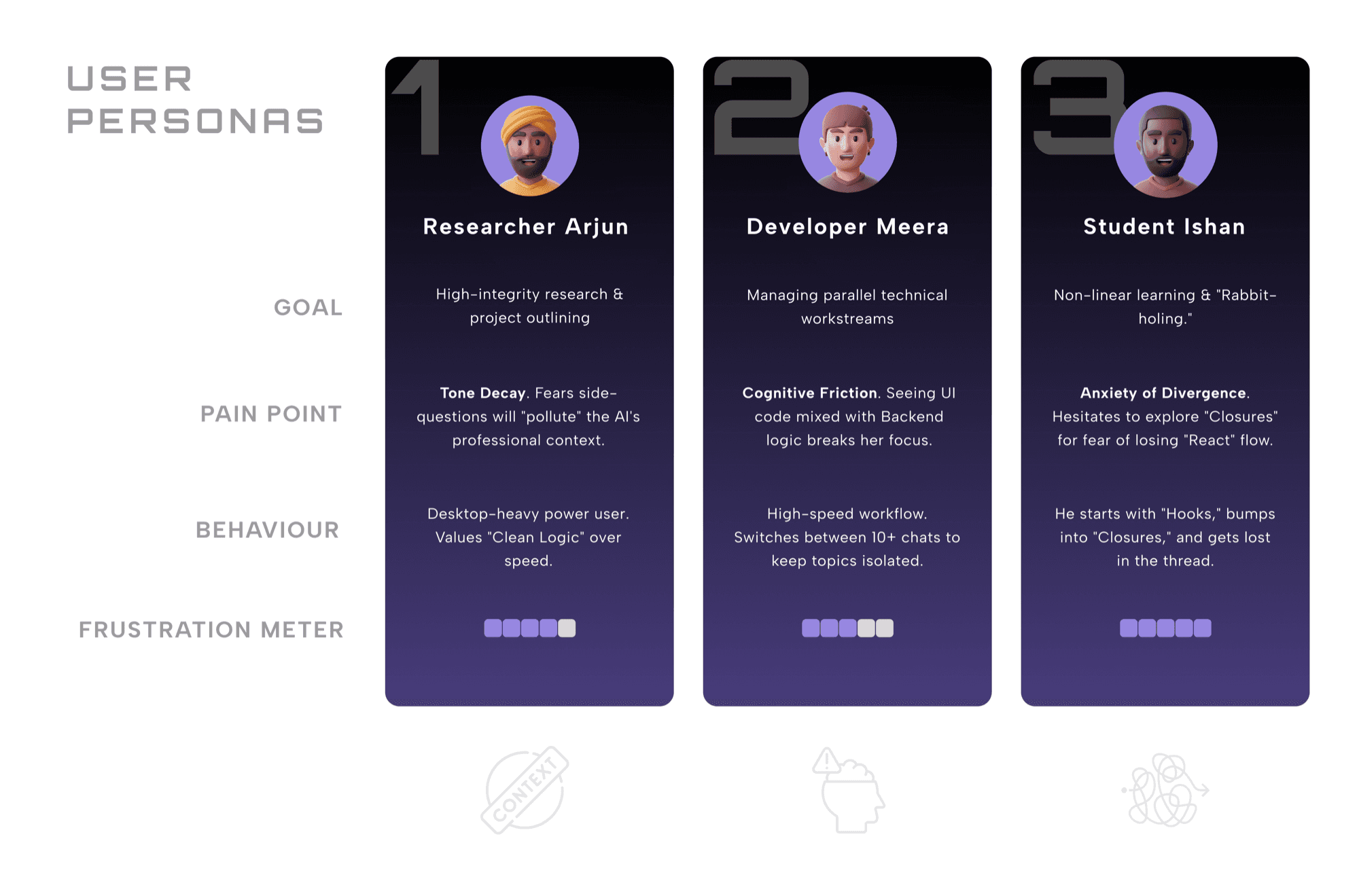
Primary persona
Student Ishan
Frustration ●●●●● 5 / 5
Ishan learns non-linearly and loves to rabbit-hole. He starts with Hooks, bumps into Closures (a JavaScript concept), and gets lost in the thread — hesitating to explore for fear of losing his React flow. His workflow is exactly the one the linear interface punishes most, so the rest of the case study follows him.
Following Ishan from motivated to lost — and finding the exact moment it breaks.
His session runs from Initiation to Failure across six stages. Emotion decays with every step — the turning point is stage four, The Conflict.
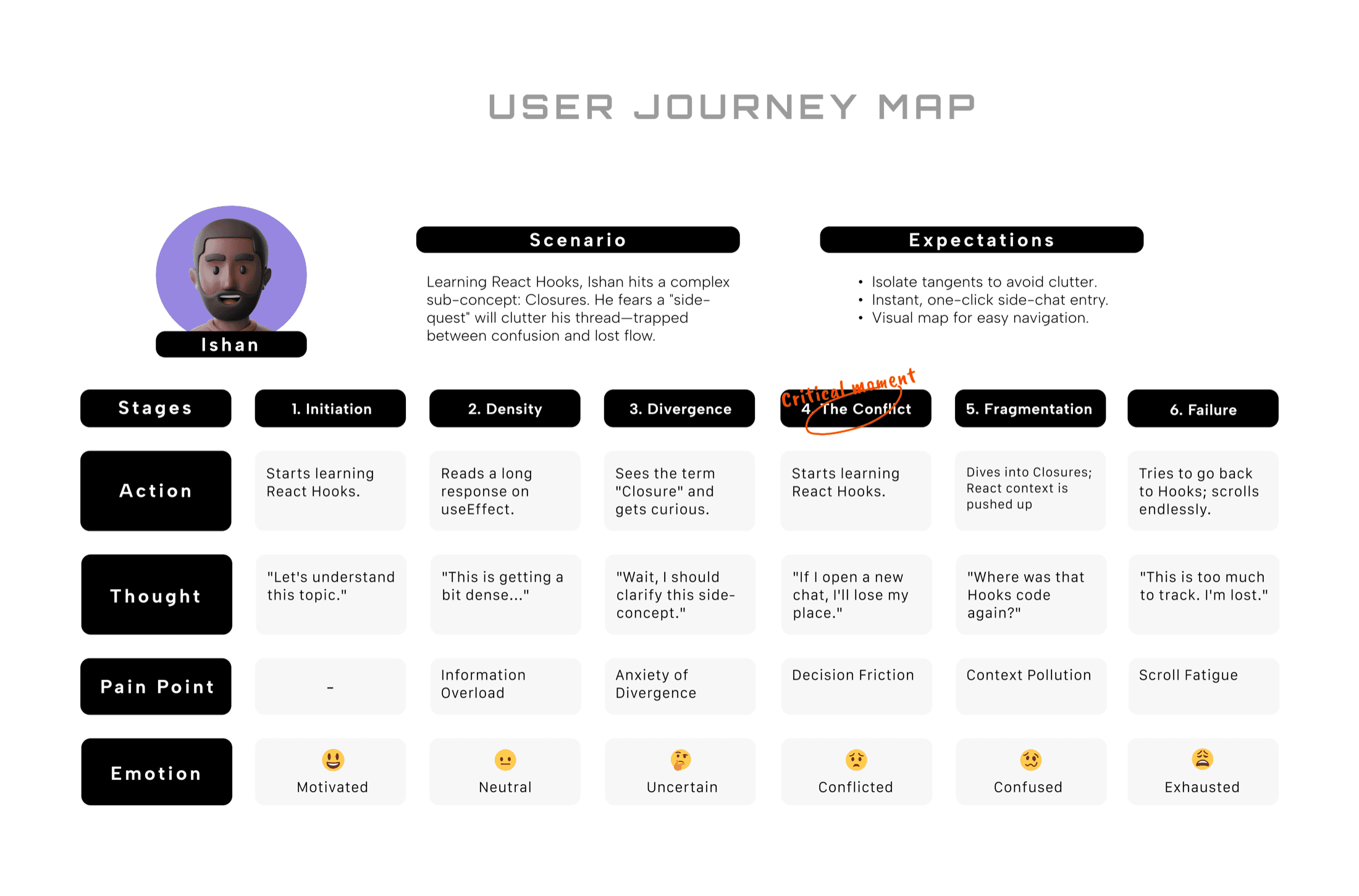
“If I open a new chat, I’ll lose my place.”
Framing the path toward a non-linear interface.
How might we…
- 01allow users to diverge without polluting the primary thread?
- 02reduce the cognitive load of navigating parallel ideas?
- 03enable seamless data transfer between branches?
Synthesis · design goals
Ishan’s failure translates into three non-negotiables. Branchscaipe must:
01
Eliminate the cost of curiosity
Make diverging effortless — one highlight starts a branch — so momentum is never the price of a follow-up question.
02
Replace lists with hierarchy
Visualise parent–child relationships so exploration organises itself, instead of polluting one flat timeline.
03
Prioritise space over scrolling
Use horizontal expansion and a subway-style map to end vertical exhaustion for good.
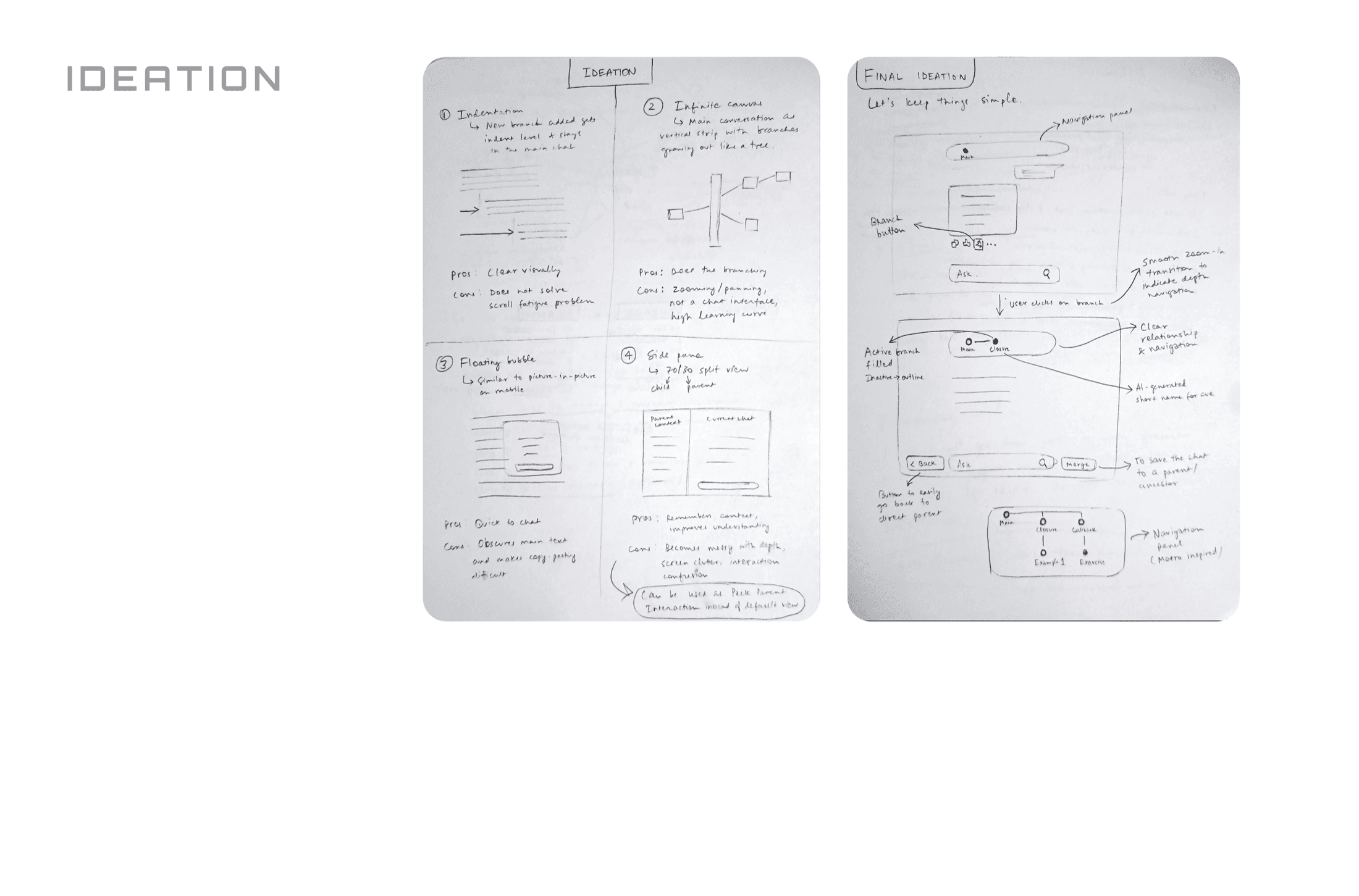
Four ways to branch — and why I killed all of them as the default.
Each concept solved part of the problem while breaking something else. Working through their trade-offs is what pointed to the real answer.
Indentation
New branches indent inside the main chat.
+Visually familiar
+Easy to grasp
–Doesn't solve scroll fatigue
–Gets messy with deep branching
Infinite canvas
The chat becomes a tree of nodes on a pannable canvas.
+Shows relationships clearly
–Needs constant zoom & pan
–Stops feeling like a chat
–Steep learning curve
Floating bubble
Branches open in a picture-in-picture bubble.
+Quick to start
–Covers the main conversation
–Hard to compare
–Feels temporary
Side-by-side split
Parent and child sit in a 70/30 split view.
+Context stays visible
–Breaks with nested branches
–Eats screen space
–Hard to scale
The final direction
Show one conversation at a time — and let it branch into layers.
Instead of displaying many conversations at once, Branchscaipe shows one. Branching drops you into a new conversational layer; the layer you came from stays one tap away. Attention is preserved, context is never lost.
The split view wasn’t wasted — it survives, repurposed as an optional “peek at parent,” rather than the default that divides your focus.
A chat that branches — with the navigation to make branching safe.
The interface stays a familiar chat. Underneath it, five moves turn a linear timeline into a navigable hierarchy — because a branch is only as good as your ability to find your way back out of it.
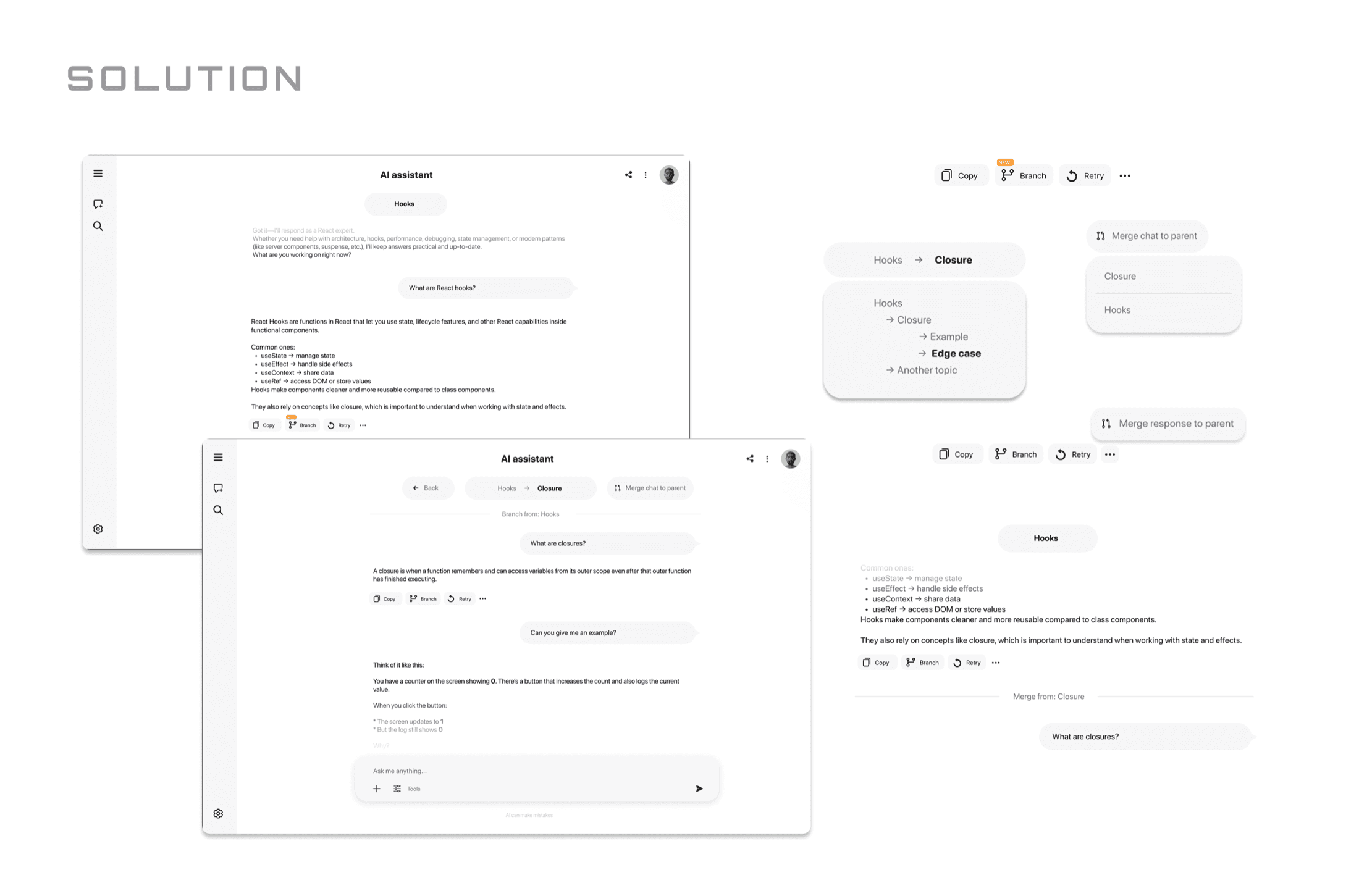
Diverge
Branch from any thought
Highlight a phrase or tap Branch under any answer to spin a curiosity into its own child conversation — without touching the parent.
Orient
Breadcrumbs that map the path
A live trail — Hooks → Closures → Callback — shows exactly where you are and lets you jump back to any ancestor in a single click.
Return
Back, in one move
A dedicated Back button returns you to the immediate parent — no repeated breadcrumb-clicking during fast, deep exploration.
Overview
The Branch Map
A map view of the whole hierarchy — summoned only when you need the bird's-eye picture, never cluttering the chat.
Reconcile
Merge to parent
Promote a useful insight from a branch back up into the parent conversation — without destroying the branch it came from.
Decisions worth defending
Why not multiple tabs?
Tabs separate conversations but destroy the relationships between them. Branchscaipe preserves them.
Why not infinite canvas?
Expressive, but it sacrifices the one thing people came for — the simplicity of chatting.
Why breadcrumbs and a map?
Breadcrumbs handle quick, everyday hops; the map handles orientation when a conversation gets complex.
Three principles held every decision in line.
01
Make curiosity free
Starting a branch should cost almost nothing. Users should never weigh whether a question is “worth” asking here.
02
Organise, don't stack
Instead of opening yet another chat, users create another branch. Conversations become a hierarchy, not a list.
03
Navigation is the product
Users should always know where they are, where they came from, and how to get back. Navigation is the core experience.
Vision
Human curiosity doesn’t move in straight lines. AI conversations shouldn’t either.
Branchscaipe isn’t another feature bolted onto the chat box. It’s a different assumption about what a conversation is — hierarchical, not linear. That one shift changes how people explore, learn, and organise what they think.
Designed & built by Divyansh Mudgil
Connect