Vidura.ai·Case study
An editor that waits for you to decide.
A hiring assignment asked for a callout component in a headless text editor. The checklist was the easy part — the real problem was that every callout forces a decision at the exact moment a writer is trying not to break their flow.
- Role
- Interaction design, UX & frontend build
- Origin
- Technical assessment → personal project
- Built with
- Tiptap · ProseMirror · Next.js
- Focus
- Editor interaction design
The brief asked me to build a callout component. I spent my time on the moment you insert one.
Vidura began as a founding-frontend-engineer assessment: build an editor on Tiptap, add a custom callout node, and design an AI-powered inline edit feature. Those requirements were a checklist, and checklists are straightforward. What wasn’t on the list was the interesting part — inserting a callout secretly bundles two decisions into one keystroke, and most editors make you pay for both separately.
The ask
A callout node with four types.
The reframe
A decision the writer hasn't made yet.
The result
Insertion and choice as one gesture.
Three parts, one underlying constraint.
Proteanics’ assessment for a founding frontend engineer. The deliverables were specific; the interface was entirely undefined — which is the whole point of building on a headless framework.
Editor foundation
Stand up a working editor on Tiptap's StarterKit — paragraphs, headings, lists, the usual node types.
A custom callout node
One node with a calloutType attribute covering four types. Insertable by keyboard shortcut, switchable between types, styled per type, aware of which type is active — and nestable inside itself.
AI inline edits
Select text, invoke by shortcut, describe a change, send it to an LLM, show a diff, accept or reject — with a hard rule that the result must stay valid for the editor's schema. Tiptap's own AI plugin was off-limits.
The underlying constraint
Tiptap is headless. It ships behaviour, not interface — no buttons, no menus, no opinions about how any of it should look or feel. Every affordance in Vidura had to be designed from nothing. That’s a burden and a gift: there was no default to inherit, so there was no default to hide behind.
Named after a counsellor, not a clerk.
In the Mahabharata, Vidura is the advisor known for intelligence, moral clarity, and the willingness to give honest counsel to people who didn’t always want to hear it. The name came before most of the interface did — and then quietly set the standard for it.
“A fitting namesake for a smart editor designed to assist and guide users through content creation.”
An assistant that counsels behaves differently from one that merely obeys. It offers, it doesn’t interrupt. It waits for you to be ready. It stays out of the way until asked, and when asked, it shows its reasoning rather than silently overwriting your work.
Every decision that follows — the deferred insert, the diff view, the shortcut that doesn’t fire until you release it — traces back to that one word.
Inserting a callout is two decisions wearing one costume.
“I want a callout here” and “it should be a warning” feel like a single action, but they aren’t. The first is instant. The second often isn’t — you may not know the type until you’ve started writing it. Most editors resolve this by making you commit twice.
The conventional path
- 1Press the shortcut — a default callout appears.
- 2Realise it's the wrong type.
- 3Stop writing, reach for a menu, change it.
Two commitments, one interruption — and the interruption lands mid-sentence.
Vidura’s path
- 1Hold Ctrl Shift Enter — the callout opens.
- 2Still holding, tap Ctrl Shift \ to cycle types.
- 3Release. The type you landed on is the one that commits.
One continuous gesture. The decision resolves before your hands ever leave the keys.
The shortcut deliberately does not fire on key-down. Deferring the commit to key-release is what turns two actions into one.
Why this particular chord
Ctrl Shift Enter is reachable with both hands at a natural span — no thumb contortion, no strain, and little chance of triggering it by accident. It also stays clear of the shortcuts browsers and editors have already claimed.
Friction in the right place
A shortcut that’s trivial to hit by accident is worse than one that takes a beat to learn. This one asks for a deliberate press — and rewards it by never needing a follow-up correction.
One node, four states — not four nodes.
The brief specified a single callout node carrying a calloutType attribute. That constraint is doing real work: because the type is an attribute rather than a separate node, switching between types is a change of state, not a delete-and-reinsert. Your content, your cursor, and your undo history all survive the switch.
calloutType = “info”
Tiptap is headless — it ships behaviour, not interface.
calloutType = “best”
Reach for Tiptap first; drop to ProseMirror only when you must.
calloutType = “warning”
An LLM returns text. Your editor needs a valid document tree.
calloutType = “error”
Invalid nodes get silently dropped on paste. Guard the schema.
The four callout types, recreated in code. Type drives the container styling — fill, rule, icon, and text colour move together.
Callouts inside callouts
Nesting was an explicit requirement, and it’s the case that breaks naïve implementations — a callout has to be able to contain block content, including another callout, without the styling or the schema collapsing.
Tiptap is headless — it ships behaviour, not interface.
Reach for Tiptap first; drop to ProseMirror only when you must.
A best-practice callout nested inside an information callout — each keeps its own type, styling, and behaviour.
Three ways in, because hands are already somewhere.
A writer mid-paragraph wants the keyboard. A writer scanning the page wants the toolbar. A writer who half-remembers the feature wants to type / and be reminded. Vidura supports all three rather than picking a favourite.
Orientation
A toolbar that mirrors where you are
The callout button restyles itself to match the type of the callout your cursor is sitting in. In a long document, it doubles as a position indicator — you can tell what kind of block you're inside without looking away from the text.
Discovery
Slash commands, hand-rolled
Built on a custom suggestion system rather than an off-the-shelf plugin. That cost more time, and bought full control over keyboard navigation, selection behaviour, and styling — the three things that decide whether a slash menu feels native or bolted on.
Familiarity
Backspace to dissolve
Press Backspace in an empty callout and the whole block disappears. It's the pattern Notion uses, which means most writers already have the muscle memory. Borrowed familiarity beats invented cleverness.
The AI proposes. You still decide.
Part 3 of the brief: let a writer select text, describe a change, send it to an LLM, and see the result as a reviewable diff — built from scratch, without Tiptap’s own AI plugin. The counsel principle lands hardest here. An advisor that rewrites your document behind your back isn’t an advisor.
01
Select
Highlight the text you want changed.
02
Invoke
A shortcut opens a small prompt beside it.
03
Instruct
Describe the change in your own words.
04
Review
A diff shows exactly what would change.
05
Decide
Accept it, or reject it and keep your draft.
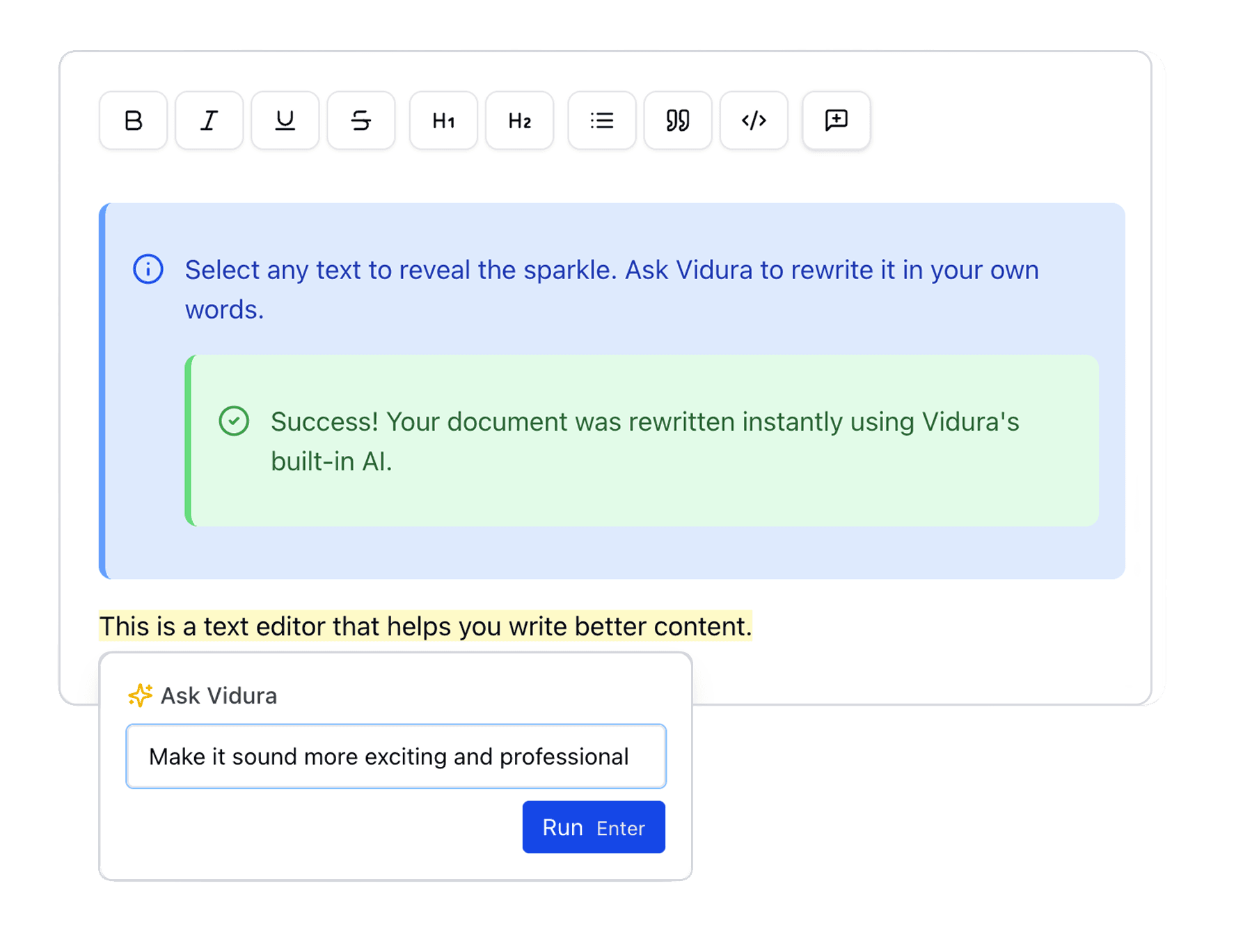
A prompt that stays next to the sentence
The input appears beside the selection rather than in a sidebar or modal, so the text being changed never leaves your eye-line.
Ask Vidura
A diff you can read at a glance
Removals and additions sit inline, in place, so the change is legible as a change — not as a mysterious new paragraph.
This is a text editor that helps you write better content. Vidura is a writing environment that sharpens every draft you bring to it.
The hard part
An LLM returns a blob of text. An editor needs a valid document tree — one that still understands custom nodes it has never heard of.
A rewrite that quietly flattens a nested warning callout into a paragraph is a data-loss bug wearing the costume of a feature. Any honest implementation has to treat the model’s output as untrusted input and reconcile it against the editor’s schema before a single character reaches the document.
Built to be extended, not just demonstrated.
Tiptap sits on top of ProseMirror, so the rule of thumb was to stay in Tiptap’s ergonomics wherever it could express the idea, and drop to ProseMirror’s primitives only where it genuinely couldn’t.
Next.js 14
App Router
React 19
UI layer
TypeScript
Type safety
Tiptap
Editor framework
ProseMirror
Document model
Tailwind CSS
Styling
shadcn/ui
Accessible primitives
Why headless at all?
A pre-built editor would have made Parts 1 and 2 trivial and the design work impossible. Headless means every affordance is a decision you have to justify.
Why hand-roll the slash menu?
Off-the-shelf suggestion plugins impose their own keyboard and selection behaviour. Owning that layer was the only way to make the menu feel like part of the editor.
Why shadcn/ui?
Accessible, unopinionated primitives that don't fight Tailwind — polish without inheriting somebody else's theme.
Why keep styling minimal?
The interesting work here is behavioural. Heavy theming would have dressed up the demo while hiding whether the interactions actually hold together.
The assignment ended. The project didn’t.
Vidura was submitted as a technical assessment, and it would have been reasonable to archive it there. I kept building instead — because somewhere between the callout node and the diff view it stopped being a deliverable and started being a question I actually wanted to answer: how much of a writing tool’s quality lives in the half-second around a keystroke?
01
Constraints are a design brief in disguise
“One node, one calloutType attribute” reads like a technical detail. It's actually the thing that makes switching types non-destructive.
02
The interesting problems hide between the requirements
Nothing in the brief mentioned when a decision should commit. That gap turned out to hold the best idea in the project.
03
Familiarity is a feature worth borrowing
Backspace-to-delete wasn't invention, it was recognition — and it needed no explanation to anyone who has used Notion.
Still in progress
What exists today is the shape the assessment asked for. The next pass is mine — extending Vidura past the brief into the writing tool I’d actually want to use every day.
In closing
Good tools don’t interrupt. They wait, and then they counsel.
Vidura is a small editor with an unreasonable amount of thought in its keystrokes — a callout that commits when you’re ready, a toolbar that tells you where you are, and an AI that shows its work before it touches yours.
Designed & built by Divyansh Mudgil
Connect